Agent AI platforms are most useful when a workflow requires more than a simple trigger and action. They help when the task involves multiple systems, unstructured information, decision points, and follow-up. For business teams, that means the best candidates are often the workflows that currently depend on employees to search, summarise, update, route, and remind.
The goal is not to automate everything at once. The goal is to identify workflows where an agent AI can reduce repetitive coordination while keeping humans in control of sensitive decisions.
Table of Contents:
- Automate Business Workflows Via Agentic AI Platforms
- How To Prioritise Workflows
- OneTab.AI For Business Workflow Automation
- A Safe Rollout Pattern
- Conslusion
- FAQs
Automate Business Workflows Via Agentic AI Platforms
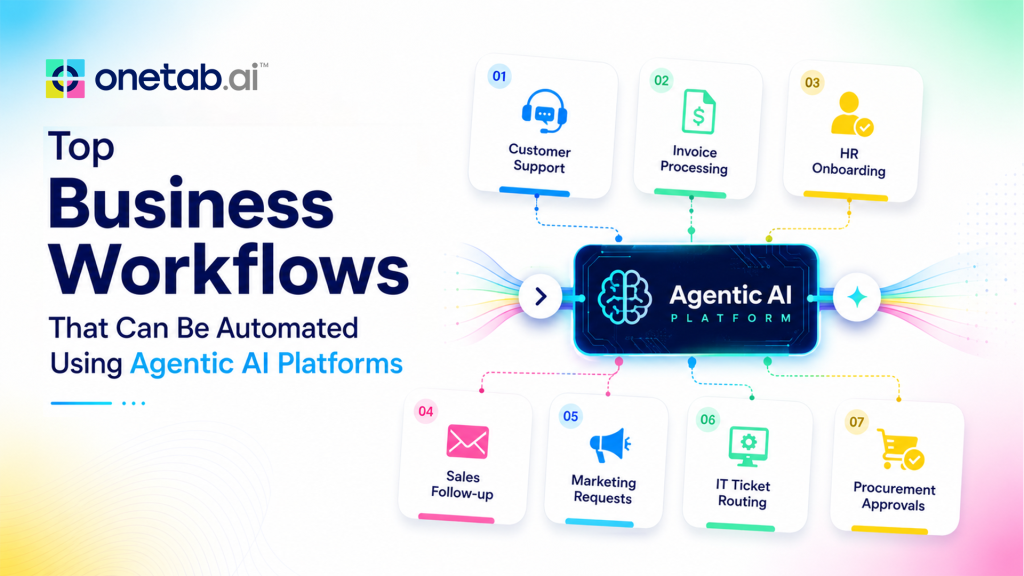
Below are practical workflow categories where an agentic AI automation platform can fit.
1. Sales follow-up and CRM hygiene
Sales teams lose time after meetings because the work continues across notes, email, CRM fields, calendars, and deal trackers. Agentic workflows can summarise the call, identify next steps, draft a follow-up, update the opportunity, and flag deals that need attention.
This does not mean the agent should send every message without review. A better first workflow is to prepare an approval-ready follow-up and CRM update. The rep reviews, adjusts, and sends. Over time, low-risk updates can become more automated.
2. Customer support triage
Support teams often start by reconstructing context. They read the ticket, check account history, inspect prior conversations, review order or usage data, and decide whether to reply or escalate. An agent AI automation platform can gather that information and draft a grounded response.
Good support workflows include escalation rules and human approval for sensitive messages. The agent can prepare the context and recommended action, while agents or managers handle complex cases.
3. HR onboarding and employee questions
HR workflows combine policy knowledge, scheduling, access requests, forms, and department-specific steps. Agentic workflows can help answer common policy questions from approved documents, coordinate onboarding checklists, schedule intro meetings, and route exceptions to HR.
This is especially useful when employees ask questions in chat or email, and HR has to search docs manually. The agent should cite or point to the approved internal source and escalate sensitive employee relations issues.
4. IT service requests
IT teams receive repeated requests for access, device support, software issues, and status updates. Agentic workflows can classify the request, gather missing details, check the SOP, prepare the required approval, and update the ticket.
Access-related workflows need strict permissions. The agent may prepare the request and verify required fields, but approval should remain with the right owner.
5. Finance Reporting And Variance Notes
Finance teams spend time collecting spreadsheet inputs, checking whether numbers changed, asking owners for explanations, and preparing summaries. Agentic workflows can gather inputs, identify anomalies, draft variance notes, and remind owners when information is missing.
Finance is a good example of assistive automation. The agent can reduce preparation time, but humans should review final numbers and explanations before distribution.
6. Marketing campaign operations
Marketing workflows involve briefs, calendars, analytics, approvals, and reporting. Agentic workflows can collect campaign metrics, summarise performance, draft status updates, and route assets for review. It can also help repurpose source material into channel-specific drafts while keeping the marketing team’s approval.
The highest-value use case is often coordination, not content generation alone. The agent keeps the campaign moving by linking assets, updates, and next steps.
7. Operations exception management
Operations teams handle exceptions that do not fit a clean rule. A shipment is delayed, a vendor misses a step, a customer record is incomplete, or an internal request is stuck. An agentic AI automation platform can gather context, classify the issue, suggest the next step, and route the case to the correct owner.
This works well when the company has clear SOPs. The agent needs to know what normal looks like, when to escalate, and what information to include in the handoff.
8. Internal knowledge search and summaries
Many employees ask the same questions because the answer is buried in docs, chats, and tickets. An AI agent can search across approved sources and summarise the answer in plain language. This can reduce interruptions for HR, IT, finance, legal operations, and managers.
The workflow should distinguish between informational answers and actions. Answering “What is the reimbursement policy?” is different from approving an expense.
9. Project and status reporting
Status reporting is often manual because updates live across project tools, docs, chat, and meetings. An agentic workflow can collect updates, identify blockers, draft the status report, and remind owners about missing inputs.
Teams should keep a human review step before reports are shared broadly. The agent can reduce collection and drafting time, while leaders keep accountability for the final message.
How To Prioritise Workflows
Use a simple scoring model. Rate each workflow by manual effort, frequency, number of systems touched, data quality, risk, and clarity of SOP. The best first workflow is frequent, painful, well-understood, and not too risky.
Avoid workflows where the data is unreliable or the decision consequences are high. Those may become candidates later, after governance and trust are stronger.
OneTab.AI For Business Workflow Automation
OneTab.AI is positioned around agents that work across company tools, understand SOPs, and reduce tab switching. Public pages describe use cases across sales, support, people and HR, operations, and other teams, with connected tools such as email, CRM, spreadsheets, helpdesk, docs, calendar, chat, and issue trackers.
That makes OneTab.AI relevant for workflows where the pain is cross-tool coordination. Teams can begin with a narrow use case such as CRM follow-up, support triage, onboarding coordination, or operations routing. They should define permissions, approval steps, and verification requirements before expanding.
A Safe Rollout Pattern
Start with read-only context gathering and draft recommendations. Add approved updates after the team trusts the output. Keep logs visible. Require human approval for customer-facing, financial, legal, access, or destructive actions. Review the workflow weekly during the pilot and adjust the SOP.
This approach keeps agentic automation practical. It reduces manual work without pretending that every business process is ready for full autonomy.
Conclusion
An agentic workflow and automation platform delivers the most value when it improves how work gets done, not just how quickly tasks are completed. By taking care of repetitive coordination across tools, systems, and teams, AI agents allow employees to spend more time on problem-solving, decision-making, and customer interactions.
The best approach is to start with one well-defined workflow, establish clear governance, and expand as confidence grows. With the right balance of automation and human oversight, businesses can build agentic workflows that are more efficient, scalable, and reliable, creating lasting improvements instead of short-term productivity gains.
FAQs
Q1. What workflows are best for agentic AI?
Workflows that span tools, require context, and include repeated manual coordination are usually the best candidates.
Q2. Can agentic AI replace existing automation tools?
It can complement them. Fixed rules should remain where they work. Agents are better for variable, context-heavy work.
Q3. How should teams manage risk?
Use scoped permissions, logs, approval gates, and narrow pilots before expanding agent responsibilities.
 Yashita Maltare
 Kashish Rugwani