
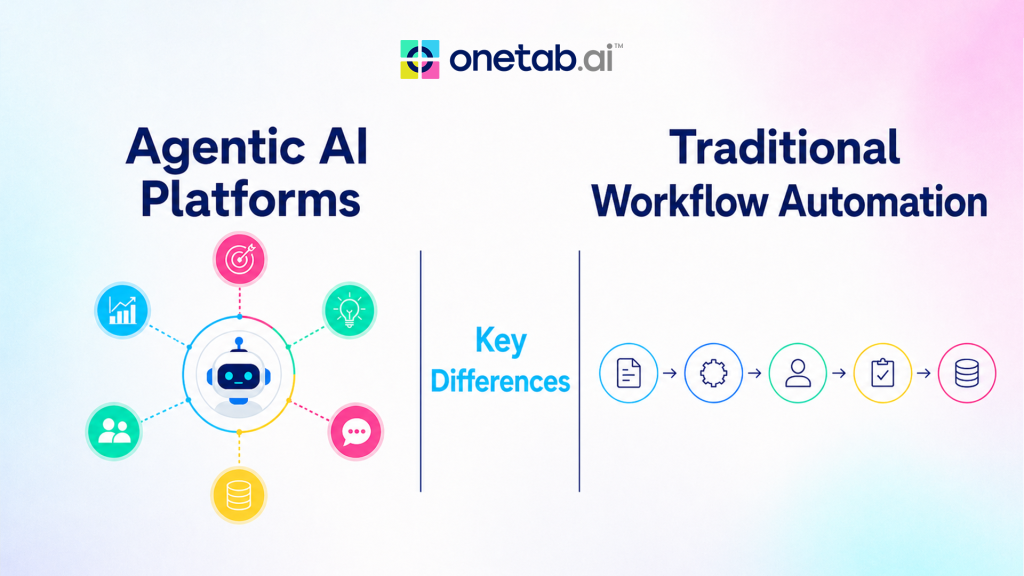
Traditional workflow automation and agentic AI platforms both reduce manual work, but they solve different operational problems. Traditional automation is best when a process is stable, rules are clear, inputs are predictable, and every step can be mapped in advance. Agentic AI platforms are designed for work that needs interpretation, planning, tool use, and adaptation across changing business contexts.
The distinction matters because many teams try to use one approach for every process. A rule-based workflow can break when an email uses unusual wording, a CRM record is incomplete, or a support request needs judgment. An AI agent can reason over context, decide the next step, and ask for review when confidence is low. At the same time, not every task needs an agent. Simple approvals, scheduled reminders, and fixed data syncs are often better served by conventional automation.
Table of Contents:
- What Traditional Workflow Automation Does Well
- Why Agentic AI Platforms Outshine
- The Core Differences
- Where Agentic AI Platforms Are Stronger
- Where Traditional Automation Still Wins
- How To Decide Which Approach To Use
- How OneTab.AI Fits This Decision
- From exploration to implementation: Evaluation Questions
- FAQs
What Traditional Workflow Automation Does Well
Traditional automation follows predefined logic. A trigger starts the workflow, conditions route it, and actions update systems or notify people. It works well for repeatable tasks such as moving form submissions into a CRM, sending renewal reminders, routing tickets by category, or syncing a spreadsheet with another database.
Its main advantage is predictability. Business teams can inspect the rule, understand the path, and test the result. If the process rarely changes, traditional automation is fast to deploy and easy to monitor. It also tends to be easier to govern because every step is explicit.
The limitation is rigidity. When the input does not match the expected pattern, the automation needs another rule. When the process depends on context scattered across email, chat, docs, CRM notes, and support history, the workflow becomes difficult to maintain. Rule chains grow, exceptions pile up, and humans keep handling the messy middle.
Why Agentic AI Platforms Outshine
Agentic AI platforms introduce goal-driven execution. Instead of only following a fixed path, an AI agent can break a request into steps, search for relevant information, use connected tools, summarise findings, draft a response, update a record, and report what it did. The platform provides an environment where agents can access approved tools, follow permissions, and show logs.
This makes agentic AI useful for work that spans systems and requires interpretation. For example, a sales operations agent may inspect a meeting transcript, check the CRM, draft a follow-up, update next steps, and flag a stalled deal. A support agent may gather account history, summarise the issue, draft a reply, and escalate with context. A people operations agent may answer policy questions from internal docs and route exceptions to HR.
The value is not just automation. It is coordination across fragmented tools, with reasoning applied to the work before action is taken.
The Core Differences
The table below represents the core differences between traditional and agentic ai automation:
| Factor | Traditional automation | Agentic AI platform |
|---|---|---|
| Process type | Stable and rule-based | Variable, multi-step, context-heavy |
| Decision logic | Predefined conditions | AI-assisted planning and judgment |
| Inputs | Structured forms and fields | Structured and unstructured data |
| Tool use | Fixed integrations | Tool use is selected by task and permissions |
| Exception handling | New rules or human fallback | Ask for clarification, retry, or escalate |
| Governance need | Rule testing and access control | Permissions, logs, evaluation, and human review |
The practical choice is not which technology is more advanced, but the operating model that fits the workflow. If the work is deterministic, use deterministic automation. If the work requires reading, comparing, deciding, and coordinating, an agentic platform may fit better.
Where Agentic AI Platforms Are Stronger
Agentic AI platforms are especially useful when teams lose time switching between tools. In many companies, important context sits across CRM records, inboxes, spreadsheets, tickets, docs, calendars, and chat threads. A human has to search, copy, paste, interpret, and update multiple systems before the actual work can move.
An agentic workflow can reduce that load by gathering the context first, proposing the next action, and completing approved updates. This is valuable in sales follow-up, support triage, onboarding, finance operations, marketing reporting, IT service requests, and project handoffs.
Agentic platforms also help when the workflow changes often. A traditional automation may need constant rule edits as teams add tools, change fields, or update policies. A well-governed agent can follow SOPs and adapt within boundaries, provided it has access to reliable knowledge and a clear approval model.
Where Traditional Automation Still Wins
Agentic AI should not replace every workflow rule. Fixed business processes still benefit from simple automation because they are cheaper, easier to test, and easier to explain. If an invoice reminder must go out seven days before a due date, a scheduled rule is enough. If every new lead from a form should create the same CRM object, a deterministic automation is appropriate.
Traditional automation also works well for compliance-sensitive paths where the action must never vary. In those cases, an AI agent may still help prepare information, but the final action should remain controlled by a fixed workflow or a human approver.
The strongest systems often combine both approaches. Rules handle predictable steps. Agents handle context gathering, summarisation, exception handling, and cross-tool coordination.
How To Decide Which Approach To Use
Start by mapping the workflow. List the trigger, data sources, systems touched, decisions required, risk level, and expected output. Then ask five questions:
- Is the process stable enough to define every branch?
- Does the work require reading unstructured information?
- Does the task span multiple systems or departments?
- What mistakes would be high-impact?
- Where should human approval be required?
If the answers point to fixed logic and low ambiguity, use traditional automation. If the answers point to judgment, fragmented context, and frequent exceptions, evaluate an agentic AI platform.
How OneTab.AI Fits This Decision
OneTab AI is built for teams that need agents to work across the tools they already use. Its public positioning centres on agents that understand company data, processes, and SOPs; connect with work surfaces such as email, CRM, spreadsheets, helpdesk, docs, calendar, chat, and issue trackers; and help teams reduce manual switching.
For teams comparing automation options, OneTab.AI is most relevant where the problem is not just a trigger-action rule. It fits workflows where an agent needs to search, summarise, update, route, draft, verify, and report across connected tools. Teams should still define permissions, approval points, and verification rules before expanding the agent’s scope.
Implementation checklist-
- Start with one workflow that is painful but bounded.
- Document the SOP, data sources, and success criteria.
- Decide what the agent can read, write, and only suggest.
- Keep human approval for customer-facing, financial, legal, or irreversible actions.
- Review logs during the pilot and expand only after the agent performs reliably.
FAQs
Q1. Are agentic AI platforms better than traditional automation?
They are better for variable, context-heavy work. Traditional automation is still better for stable, predictable tasks.
Q2. Can both approaches work together?
Yes. Many teams use rules for fixed steps and agents for research, summarisation, exception handling, and cross-tool work.
Q3. What should teams watch before adopting agentic AI?
Teams should evaluate tool permissions, data quality, human approval points, logs, and how the agent handles uncertainty.
 Onetab
 Judah Guber
 Kashish Rugwani