Approved vendors
Onetab AI only dispatches vendors from your approved list, following your preferred-vendor rules.

It doesn't just create the ticket. It works the request until it's closed.
Onetab AI receives the request, identifies the resident and unit, coordinates the work order and vendor, follows up, and moves the request toward resolution.
Creating the ticket is only the first step. Onetab AI keeps the request moving.
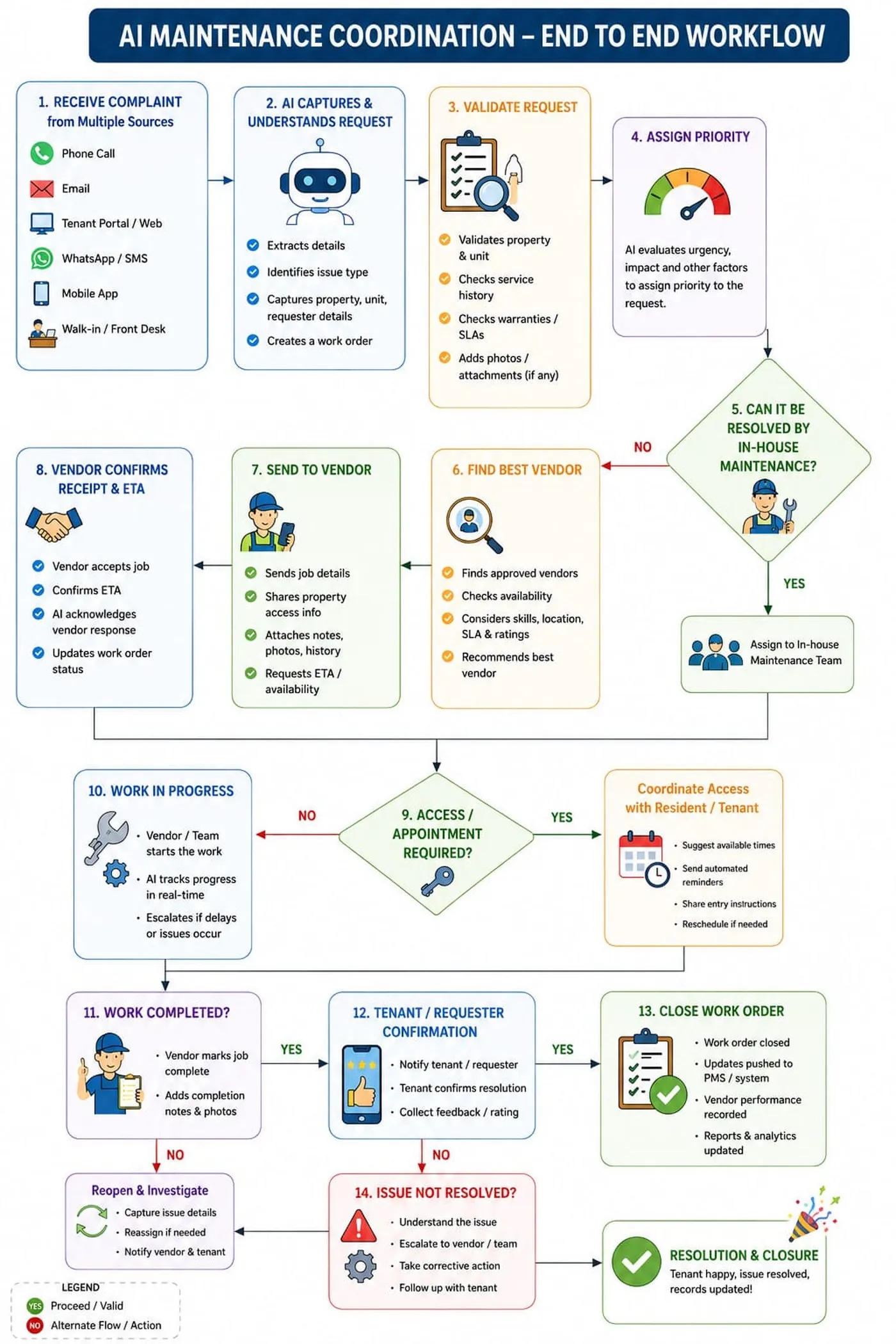
See Onetab AI handle a request
Not a chatbot that files a ticket and waits. Watch Onetab AI identify the request, coordinate the work, follow up, escalate when needed, and move it toward closure.
Open requests keep moving outside business hours, and urgent issues escalate according to your emergency rules.
Start AI-assisted. Expand autonomy as your team approves more actions.
Onetab AI can connect the maintenance workflow to your property management system and keep the work order moving, so your PMS stays the record of what happened.
A resident reports the issue. Onetab AI identifies the property and unit and classifies the request.
Onetab AI creates the work order in your PMS, or updates the one that's already open.
An approved vendor is chosen using your vendor list and routing rules.
The resident confirms when they're available, so the vendor can get in.
Vendor updates and status changes are recorded on the work order in your PMS.
The resident confirms the fix before the request is closed.
Onetab AI follows your configured vendor, cost and escalation rules, while your team controls the sensitive decisions. Set the rules once and they apply to every request.
Onetab AI only dispatches vendors from your approved list, following your preferred-vendor rules.
Requests are routed by the criteria your team already uses, such as property, trade, location and availability.
Any request above your approval limit waits for human sign-off before it moves forward.
Requests classified as emergencies follow your escalation process and notify the people you designate.
If a vendor doesn't respond within your window, Onetab AI follows up, then escalates according to your rules.
Your maintenance team spends less time chasing vendors and updating residents, and more time on exceptions that need human judgment.
Requests can be triaged and moved forward after hours, using your configured rules for priority and escalation.
Open requests are followed up automatically. If a vendor misses the configured response window, Onetab AI follows up and escalates according to your rules.
What Onetab AI takes off your maintenance team’s plate, on every request and at any hour.
Requests are received and kept moving outside business hours, using your priority and escalation rules.
Request, work order, vendor, access, status and close-out run as one workflow.
Your team can see what Onetab AI did on each request, and when.
See Onetab AI handle a maintenance request from intake to closure in a 15-minute walkthrough.